

- Solutions
- Use Cases
- Industries
- Resources
- About
- Contact Us
- InstantData

Help Center ❯ InstantData ❯ Getting Started
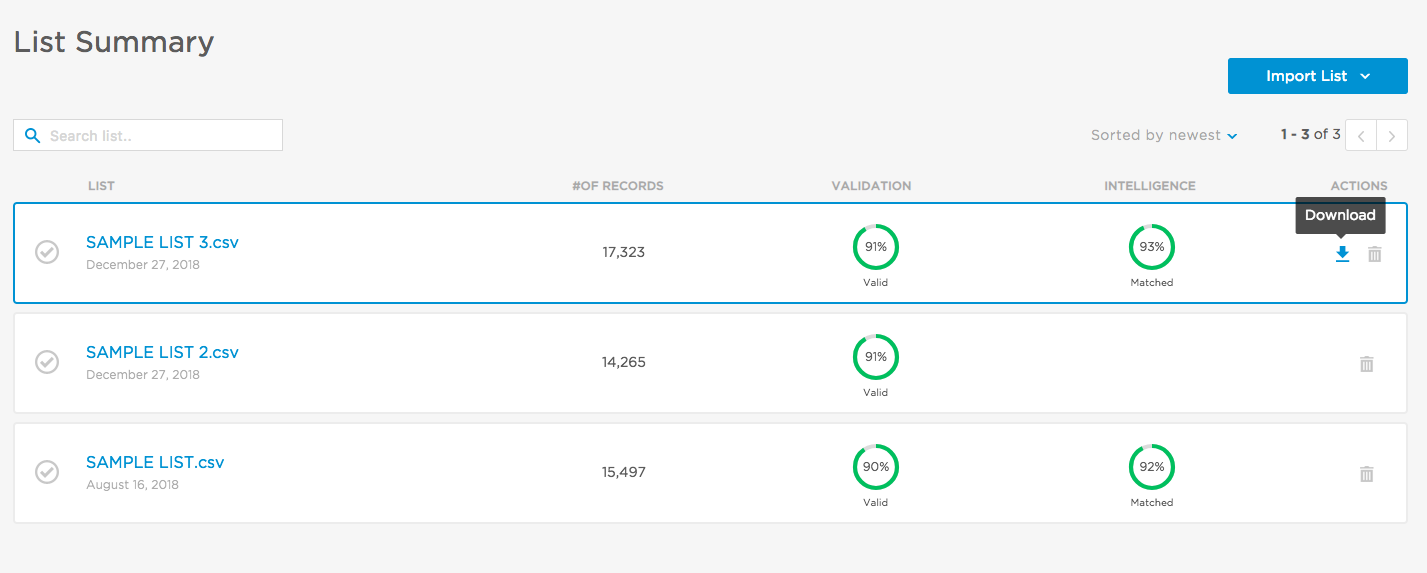
Download data or delete lists on the List Summary page.
The List Summary page shows all of the email lists you have uploaded and the services you have run on those lists. You can find the List Summary page by clicking “Lists” in the top navigation bar.
You can download results or delete a list using the action icons on the right. You can also import a new list using the “Import List” icon at the top.
 FinServ / FinTech
 AdTech / MarTech
 Subscription Commerce
 Automotive
 Entertainment
 Hospitality & Tourism
 LeadGen
 Media
Media Nonprofit & Political
 On-Demand & Delivery
 Restaurant & Food Services
 Retail & Ecommerce